What people call "vibe planning" is really a loop — and the human stays in the driver's seat.
The moment the model was confidently wrong
I asked Claude to help me stand up a GPU container on an NVIDIA DGX Spark. Early in the session, it told me — politely, fluently, and with total confidence — that I was mistaken about my own hardware:
"Claude's knowledge cutoff is August 2025. NVIDIA released the CUDA 13 toolkit after that date."
The implication was that I should target CUDA 12.x. But the machine in front of me was running CUDA 13.2.1. The model wasn't lying; it was reasoning from a world that ended in August 2025. The DGX Spark lives in a later one.
That gap — between what the model knows and what is actually true on the metal — is the whole reason this article exists. Hand an AI a problem and it will generate. It will produce a plan, a Dockerfile, a confident paragraph about CUDA versions. What it won't do reliably is think against reality: check the live state, notice when its own assumptions are stale, and record what it learned so the mistake doesn't come back next week.
That's the human's job. And it turns out you can build a small amount of structure that makes the human good at it — consistently, across very different projects. I've started calling that structure The Planning Loop.
Most people write a plan once. That's the bug.
The default mental model for "planning" is: think hard up front, write the plan, then execute it. The plan is a document you produce before the work and mostly ignore during it.
That model breaks the instant you're working under real uncertainty — which, with AI in the loop, is always. The model's knowledge is stale in places. The hardware behaves unexpectedly. A dependency you assumed was fine turns out to be load-bearing. A plan written once and frozen is wrong by Tuesday.
The Planning Loop treats the plan as a living document maintained under uncertainty. Concretely, it's a cycle:
Plan → Implement → Investigate → Decide → Modify → (repeat)
You define intent. The AI implements a slice. Something surprises you. You investigate it. You make a decision and record it. You modify the plan to reflect what you now know. Then you go again. The AI is a power source inside each step — it drafts, it runs commands, it lays out tradeoffs — but it is not the loop. You are.
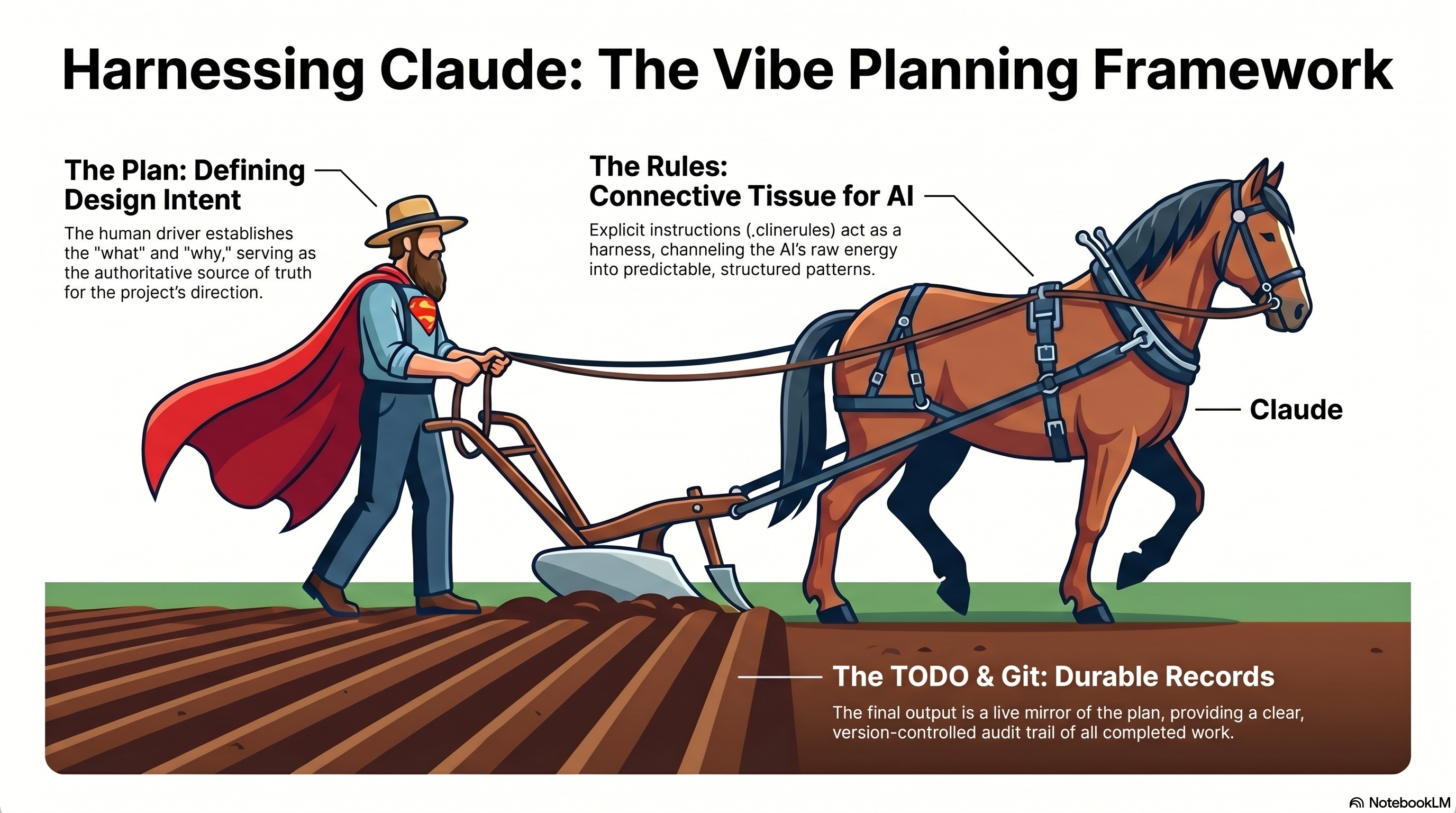
I keep coming back to the metaphor in that diagram. The human is the farmer driving the plow. Claude is the horse — enormous power, no idea where the field ends. The rules you give the AI are the harness: they channel raw capability into straight furrows instead of a trampled field. The plan is the plow, directing where the work bites. And the furrows left behind — your task list and your git history — are the durable record that you actually did the work, in order, on purpose.
"Explicit instructions act as a harness, channeling the AI's raw energy into predictable, structured patterns."
Here's the part that makes this more than a metaphor: each phase of the loop gets its own configuration. In my setup, each phase literally has its own rule file and its own home in the repo.
| Loop phase | What I do | What the AI does | Lives in |
|---|---|---|---|
| Plan | Define what + why | Draft / expand the plan | docs/plans/<feature>.md |
| Implement | Approve one task | Generate code, one commit each | docs/plans/TODO.md, git |
| Investigate | Frame the question | Separate findings from actions | docs/investigate/ |
| Decide | Choose among options | Lay out tradeoffs, write the record | docs/adr/NNNN-*.md |
| Modify | Adjust course | Update the plan in place | back to docs/plans/ |
That table is the methodology. Everything below is one trip around it.
The demo: one full loop, caught in the act
The plan started about as minimal as a plan can be — five lines in docs/plans/dgx-docker-compose-gpu.md:
- Verify Docker, Docker Compose, and the NVIDIA container runtime are available
- Create a Dockerfile for a GPU-capable test container
- Create a
compose.yamlthat requests GPU access - Run
docker compose up gpu-infoto verify GPU visibility withnvidia-smi - Run a GPU-backed command through Docker Compose to validate real GPU usage
Plan. When I activated the workflow, the synchronization rule did the first useful thing automatically: it generated docs/plans/TODO.md from the plan file, turning intent into a live checklist of GitHub-style checkboxes. The plan and the TODO are now two views of the same truth, kept in sync by a rule.
Implement. Task 1 — verify prerequisites — completed cleanly. Docker 29.2.1, Compose v5.0.1, NVIDIA Container Toolkit 1.19.0, an NVIDIA GB10 (Blackwell) reporting driver 580.142. Checkbox ticked, committed.
Investigate. Then Task 3 hit a wall. docker compose run failed at container init with a cryptic error:
open /usr/bin/nvidia-cuda-mps-control: no such file or directory
This is exactly the moment the loop is built for. A "vibe" approach guesses and flails. Instead, the work moved into docs/investigate/dgx-prerequisites.md, which forces a discipline: separate Findings (what's true) from Actions Taken (what I did). The finding was specific and damning:
"Snap confinement fundamentally blocks the NVIDIA container runtime from injecting GPU resources into containers."
The DGX shipped Docker as a snap package. Snap's sandboxing won't let the NVIDIA runtime bind-mount the host driver binaries into the container — so the GPU is visible to the host but unreachable from inside any container. No amount of tweaking compose.yaml fixes that; it's a confinement problem one layer down.
Decide. A blocker this structural isn't a code tweak — it's an architectural decision that will outlive this one task. So it became an Architecture Decision Record, docs/adr/0001-native-docker-over-snap.md:
Decision: We will use native Docker Engine from Docker's official apt repository rather than the Ubuntu snap package.
The ADR is the most important artifact in the whole demo, and not because of the decision itself. It's important because of what it does to future sessions. It records three alternatives I considered and rejected — snap with MPS disabled, snap with the opengl interface, direct device bind-mounts — each with a one-line reason it doesn't hold up:
"Direct device + library bind mounts… Works for basic
nvidia-smibut breaks for anything requiring full toolkit injection. Not maintainable."
And ADRs are immutable once accepted. That's the mechanism that makes the loop compound: the snap-versus-native question is now settled. No future session — mine or the AI's — gets to re-propose snap Docker and burn an afternoon rediscovering why it fails. The decision is memory.
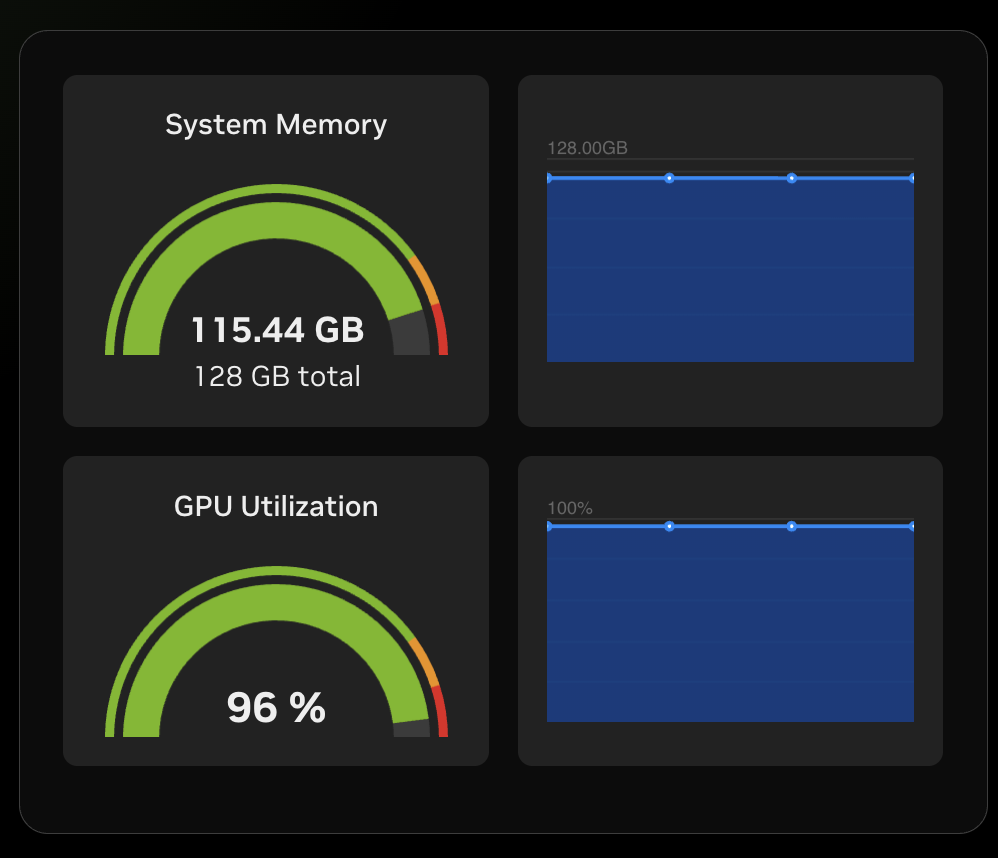
Modify. With Docker reinstalled natively, the plan moved again. The Dockerfile and compose.yaml landed (the compose file requesting the GPU through the durable deploy.resources.reservations.devices form, not a brittle hack), and Task 5 ran a real 4096×4096 PyTorch matrix multiply on the GB10. The GPU pegged near 96%. The loop closed.
One more artifact fell out of all this for free: a docs/process/dgx-gpu-workflow.md runbook, so the next person (or the next me) can reproduce the whole thing in three commands. That trail — investigate → ADR → process — wasn't extra work. It's the byproduct of working under the loop.
The infrastructure: rules, skills, memory, hooks
If the loop is the methodology, here's the machinery that enforces it. Four layers, each doing a distinct job.
Rules are always-on defaults — the operating system. A set of planning-* rule files load into the model's context at the start of every session, before any tool fires. They define the canonical docs/ layout, how plans sync to TODOs, how ADRs are structured, how commits are written. There's no command to remember; the rules are simply present, the way an OS is present. A small script wires them in globally, so every project on my machine inherits the same discipline without copy-pasting config.
Skills are pulled in on demand — the apps. Where a rule is always on, a skill fires only when its task type comes up. A /db-drop skill triggers an investigation-first workflow for destructive SQL. A /kaggle:new command scaffolds a competition project. Each is a real, self-contained capability you invoke when you need it and ignore when you don't.
Memory carries decisions forward — so nothing gets re-litigated. ADRs are one form of this. Auto-generated project memory is another. The point of both is the same: capture the why alongside the how, so a future session starts from settled ground instead of an empty prompt.
Hooks enforce at the moment of action — the guardrails. Some risks aren't reasoning failures; they're specific, irreversible commands. For those, a rule isn't enough — you want a hard stop at execution time. The design principle I've landed on is clean:
"If the risk is a specific runtime Bash event, add a hook. If the risk is a reasoning failure… a rule is sufficient."
So a destructive DROP TABLE or an irreversible notebook push gets a hook that blocks the AI and hands control back to me. A "which folder does this doc belong in" question just gets a rule.
The unifying idea behind all four layers is a single test for what's worth keeping:
"If a document is expected to matter in 6 months, it should probably live in
docs/."
The payoff: the loop generalizes
The DGX Spark story is one turn of the loop on one infrastructure problem. The real return shows up when the same loop runs across completely different work — which is why I packaged it.
The rules and skills above don't live only in the demo repo. They're published as a small plugin marketplace, and they tier cleanly:
- Tier 1 — the always-on spine: the planning rules, loaded into every session.
- Tier 2 — a reusable per-domain harness: for example, a Kaggle plugin that packages the hard-won conventions of an entire problem class once.
- Tier 3 — project specifics: each project carries only its own
docs/plans/— the hardware, the slug, the exact scripts. Never a duplicated config.
That's what "domain-agnostic but consistently rigorous" actually means: Tiers 1 and 2 hold constant; only Tier 3 changes. The same loop runs an R&D Kaggle competition (scaffold, per-run leaderboard tracking, offline submission packaging, a preflight checklist, and a hook that won't let the AI burn my GPU quota on an irreversible notebook push) and a data pipeline (a guard that makes destructive SQL impossible without an investigation-first workflow and an explicit, auditable confirmation).
And here is the thread that ties the whole thing together. Remember the model being confidently wrong about CUDA 13? That one-off insight didn't evaporate when the session ended. It got promoted into a permanent, always-on rule:
"Output from prior Claude or AI sessions is a hypothesis, not a verified fact… A claim that 'the migration was never applied' is as likely to be wrong as right — the live system is the only authoritative source."
That is the entire article in one move. An insight earned mid-loop (the model's knowledge is stale) became an investigation, became a recorded decision, and is now codified infrastructure that runs on every project I touch. The same skepticism that caught the CUDA-13 error later caught a near-miss in a completely different domain — a database migration the model swore had never been applied, which the live schema flatly contradicted.
That's what maintaining a plan under uncertainty actually buys you: the mistakes you make once become the defaults you never make again.
So: stop writing plans once
The shift is small and it's mostly a mindset. Treat the plan as alive. When the AI surprises you — and it will — don't paper over it; investigate it, decide, record the decision, and modify the plan. Give the AI a harness of always-on rules so its raw capability runs in straight lines. Reach for a skill when the task calls for one, a hook when the risk is irreversible, and memory so you never re-litigate a settled question.
The plan is a living document. The loop is how you keep it honest. The rules are the harness. And the AI is the horse — not the farmer.
The full demo, including every artifact referenced here, is in msusol/vibe-planning-dgx-spark-demo. The planning rules and domain plugins are in msusol/claude-code-plugins. A companion piece on running a Kaggle competition through the same loop is coming next.